FMLA Form – For Family
Family Medical Leave Act form for Family
File: WH-380-F_FMLA-for-Family.pdfFamily Medical Leave Act form for Family
File: WH-380-F_FMLA-for-Family.pdfFamily Medical and Leave Act form for Employee
File: WH-380-F_FMLA-Form-for-Employee.pdf
As campus announced earlier this month, furlough has been reduced by 1 day.
Please take steps to assure that you do not over-use furlough. See Take Action below.
If you do not know your furlough balance, please ask your supervisor or email payroll@fpm.wisc.edu.
Be sure to take furlough days by June 30, 2021 and enter furlough for approval no later than June 16, 2021.

With the new requirement, we realize that you may have future furlough time already planned or entered in your timesheet that would exceed the new furlough limits!
Please take action so that you do not over-use furlough time.

Once you know your furlough balance, choose what best fits your situation from the three scenarios below :

With the new requirement, there are bound to be some employees who have future furlough time already entered in the timesheet that would exceed the new furlough limits.
You have two options:
FP&M has worked with campus to develop a solution to this issue. No action is needed on your part.
If you have over-used furlough time and the furlough has already been processed, the solution depends on your employee type:


Please note that employees must still take any remaining furlough by June 30, 2021.
Academic Staff: you must enter your furlough early so that your supervisor has time to approve it by June 16.
University Staff Exempt and Crafts Workers: you must enter your furlough by the biweekly payroll deadlines.

Update on employee furlough program, Chancellor announcement 4/16; with translations
Furlough Chart (find how much furlough time you are required to take)
Supervisors: how to approve furlough
How to log furlough time – University Staff
How to log furlough time – Academic Staff

 As a result of the UW System’s Split Benefits Project and Single Payroll Project, payroll and benefit deduction changes will occur for FP&M employees this year.
The changes will impact University Staff in April and Academic Staff in July. Learn more about how you can prepare for these changes.
Beginning in April 2021, UW System employees who are paid biweekly will have most benefits deductions divided evenly over the first two biweekly paychecks of each month.
Most deductions for benefits such as health, dental, vision, and life insurance will be split evenly over the first two biweekly pay periods of each month
In months when there are three pay periods, benefits deductions will not be taken from that pay period (except for Wisconsin Retirement System, Tax Sheltered Annuity 403(b) and Wisconsin Deferred Compensation 457 contributions)
Benefits deductions will be split evenly over two paychecks each month starting with your April 22, 2021 paycheck
If you have automatic payments set up (for example, mortgage, car loan, utilities, etc.):
Visit the Split Benefits Deductions webpage for the following resources:
Email questions to benefits@fpm.wisc.edu
In July 2021, the UW System will move all employees who are currently paid monthly to a biweekly payroll schedule. In addition, most benefits deductions will be divided evenly between the biweekly paychecks.
On July 30, 2021, you will receive a partial monthly paycheck for days worked between July 1-July 17.
Starting August 12, 2021, you will begin receiving biweekly paychecks every other Thursday (except on Legal Holidays).
Most deductions for benefits such as health, dental, vision, and life insurance will be split evenly over the first two biweekly pay periods of each month starting with your August 26, 2021 paycheck.
In months when there are three pay periods, benefits deductions will not be taken from that pay period with the exception of Wisconsin Retirement System, Tax Sheltered Annuity 403(b) and Wisconsin Deferred Compensation 457 contributions.
Visit the Single Payroll webpage to view the following resources:
Email questions to payroll@fpm.wisc.edu

Important News available in supported languages:
Important News • Noticias importantes • Xov Xwm Tseem Ceeb • གལ་་གསར་འར། • 重要新闻 • महवपणर्
ू सचना
The Families First Coronavirus Response Act (FFCRA) was enacted on April 1, 2020, and provided paid leave entitlements to qualifying employees who were unable to work or telework for specific COVID 19- related reasons. (Telework is defined as work you perform while you are at home or at a location other than your normal workplace.)
These paid leave provisions are set to expire on December 31, 2020.
After December 31, 2020, employees who are unable to work or telework for COVID 19-related reasons will continue to have a variety of leave options available to them. However, employees will need to use their own accrued leave during their absences in order to receive pay.
More information is available at hr.wisc.edu/covid19/emergency-leave. If you have questions, please speak with your supervisor or human resources department.
The Families First Coronavirus Response Act (FFCRA) was enacted on April 1, 2020, and provided paid leave entitlements to qualifying employees who were unable to work or telework for specific COVID 19- related reasons. (Telework is defined as work you perform while you are at home or at a location other than your normal workplace.) These paid leave provisions are set to expire on December 31, 2020. After December 31, 2020, employees who are unable to work or telework for COVID 19-related reasons will continue to have a variety of leave options available to them. However, employees will need to use their own accrued leave during their absences in order to receive pay.
File: Federal-Emergency-Leave-Program-Expiring-ESHTCN.pdf
If an employee is unable to use either their personal holiday hours or vacation carryover balance during the COVID-19 pandemic, the employee will not lose those balances when they would typically expire: December 31, 2020 (for University Staff), or June 30, 2020 (for Faculty, Academic Staff, and Limited Appointments).
Instead, the employee’s personal holiday hours and/or vacation carryover balance will remain available until December 31, 2021 (for University Staff), or available until June 30, 2021 (for Faculty, Academic Staff, and Limited Appointments).
The University Staff Annual Leave Conversion is an opportunity to make a choice to bank unused vacation carryover or unused current year vacation. This needs to be completed by submitting the appropriate form no later than December 4, 2020. Read on to learn about your options, eligibility, and how to complete the Banked Leave Conversion form.
University staff employees can choose to convert banked leave via one of these options:
The options available depend on your eligibility.
University Staff* are eligible for different leave conversion options based upon their annual leave earning rate.
*Crafts Workers are not eligible to bank leave*
For more information, consult the Vacation HR policy.
After you know your leave conversion eligibility it is time to complete the annual Banked Leave Conversion Form. The banked leave conversion forms are available online at MyUW (my.wisc.edu) > Time and Absence > Leave Reports.
University Staff employees who have questions can watch this short (7 minute) video about the 3 main components of the Annual Leave Conversion Option Form and how to complete it correctly.
The video works best in Google Chrome, Microsoft Edge or Firefox (the video may not work in Internet Explorer).

On October 26, 2020 Chancellor Rebecca Blank sent the below message to employees. This message has been translated into multiple languages:
This year the enrollment period is September 28-October 23, 2020, ending at 4:30pm 10/23. Remember to enroll or make changes to your 2021 benefits by 4:30 pm, Friday, October 23, 2020. (This is only needed if you want to make changes or enroll in benefits.)
1) Log into the MyUW portal at my.wisc.edu 
2) Go to the Benefit Information tile
3) Click on the Enroll link
Or, see the email you received from UWSystemhr@uwsa.edu to learn more and follow the instructions to enroll.
Annual Benefits Enrollment is the only time you can make changes to certain benefits without having an eligible life event (for example, marriage, birth, or divorce) or qualifying employment change during the year.
Please use the benefits enrollment checklist to help you prepare, guide, and act.
See what changes are allowed during Annual Benefits Enrollment (ABE).
See the UW-Madison Office of Human Resources’ Annual Benefits Enrollment website for additional information and online pre-recorded enrollment events, “Benefits 2021: What You Need to Know”.
Watch one of the enrollment events if you need additional guidance in navigating your benefits enrollment.
Annual Benefits Enrollment is the only time you can make changes to certain benefits without having an eligible life event (for example, marriage, birth, or divorce) or qualifying employment change during the year. This year the enrollment period is September 28-October 23, 2020.
Please use the benefits enrollment checklist to help you prepare, guide, and act.
See what changes are allowed during Annual Benefits Enrollment (ABE).
See the UW-Madison Office of Human Resources’ Annual Benefits Enrollment website for additional information. There you will find a calendar of online enrollment events, “Benefits 2021: What You Need to Know” starting October 1, 2020.
Attend one of the enrollment events if you need additional guidance in navigating your benefits enrollment.

The Well Wisconsin Program and StayWell offer resources to help you lower your health risks and support you in achieving your health and well-being goals.
UW employees, retirees, and their spouses who are currently enrolled in the Wisconsin State Group Health Insurance plan are eligible to participate in the Well Wisconsin program.
You can earn an incentive when you complete a health screening, a health assessment, and one StayWell well-being activity. Learn more on the the OHR Health Screenings and Well Wisconsin web page.
Step One: Complete your health screening
Complete a health screening by attending an on-site health screening hosted by your employer or by visiting your health care provider.
Step Two: Complete your health assessment
The health assessment can be found on the StayWell Wellness Portal. Request a paper assessment by contacting the StayWell HelpLine at 800-821-6591.
Step Three: Complete one well-being activity through StayWell
You can choose from a number of activities that will improve your health and well-being. For a list of well-being activities that qualify for the incentive, visit the StayWell Wellness Portal.
For language support or questions, please contact StayWell at 1-800-821-6591.
This year’s annual enrollment period is September 28 – October 23, 2020. See a preview of the Annual Benefits Enrollment (ABE).
Could you use a quick refresher on logging your furlough and leave? You’ve come to the right place.
Sections: Reminders | How to Enter Furlough and Leave | Frequently Asked Questions | Timing
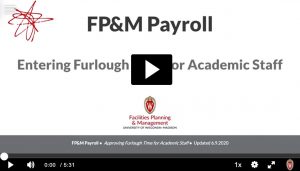
Watch this helpful video (5 minutes) and follow along, or continue below for instructions.
Academic Staff employees who are paid monthly must enter all time and absences through MyUW. This includes two parts: Part 1) Record furlough time in the Timesheet tab, and Part 2) Monthly leave reporting in the Request Absence tab. See overview instructions for each.
Record your furlough time right away during the week it is used.
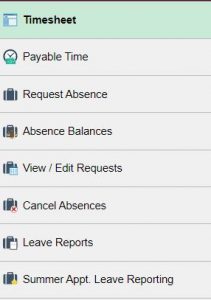
1. Go to MyUW (my.wisc.edu) > Select TIME AND ABSENCE tile
2. Use TIMESHEET tab for entering the furlough day and hours worked for that week
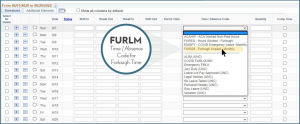
3. Find the Time/Absence Code dropdown menu
> Select the code FURLM for any full or partial furlough days (in Timesheet)
> Enter hours (as whole hour increments) under Quantity
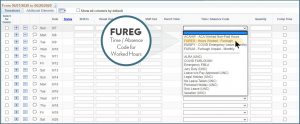
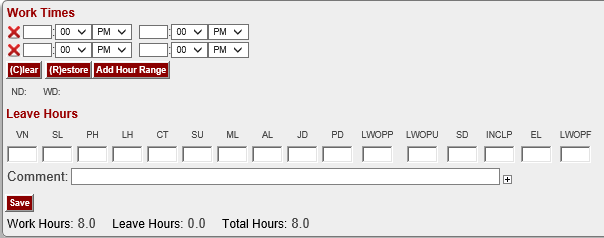
4. For the remainder of the days in that week, enter the FUREG code in the timesheet for hours worked during the same week. Enter FUREG hours worked (as whole hour increments) under Quantity.
Do not enter exact hours in the Shift In/Break Out/Break In/Shift Out columns.
5. Click “Submit” button.

As a reminder, your furlough entry is not the only action required for the month. Enter your vacation, personal holiday, sick leave time, or “no leave taken” as follows:
Use the REQUEST ABSENCE tab to record your monthly leave usage, even if you did not take any leave days for the month.
Q: Do I need to log furlough in my monthly leave reporting (Absences in MyUW)?
A: No. Please do not use the furlough code or log furlough days in your monthly leave reporting.
Q: If my only days off in a given month were furlough days, do I still need to enter a “No Leave Taken”?
A: Yes. Furlough is different from Leave. Enter a No Leave Taken as you normally would in your Monthly Leave Reporting using the Request Absence tab on MyUW as shown above.
TIMINGUpdated January 7, 2021
Furlough must be entered and approved by the following dates for Academic Staff in order for the furlough deduction to be taken in that month.
If you have questions on furlough entry, please email benefits@fpm.wisc.edu.
 On June 29th, the Group Insurance Board (GIB) approved the following flexibility granted by the IRS due to the COVID-19 pandemic:
*Employees may only decrease their annual contribution to the amount already contributed or spent year-to-date, whichever is greater.
*If this guideline should change, we will notify HR Reps / HRS Coord. as soon as possible.
Employees who are currently enrolled in the Dependent Care FSA (DCFSA) may make an Election Change Request.
The application must be received within 30 days of the closure and/or decrease in hours of the daycare location (or) within 30 days of the return to daycare.
Reason for Request: Change in Cost
Applications will be processed effective the 1stof the month on/following the receipt of the application.
There is no current change to FSA or DCFSA rollover guidelines.
A change is determined by IRS guidelines, Connect Your Care (CYC) and Employee Trust Funds (ETF)
Medical FSA: $500 Rollover
Dependent Care FSA: No funds may roll over
FSA contributions (with the exception of the standard $500 Medical FSA rollover) must be used prior to end of day 12/31/2020 or in cases of termination prior to 12/31/2020 –the last day of the month in which the last deduction occurred.
Supervisors and managers can approve Academic Staff’s time and furlough through the Time and Absence dashboard found on the MyUW Manager portal tile of MyUW (my.wisc.edu). The Payable Time Approvals section displays pending time approval requests, based upon the criteria, including date range, in Selection Criteria.
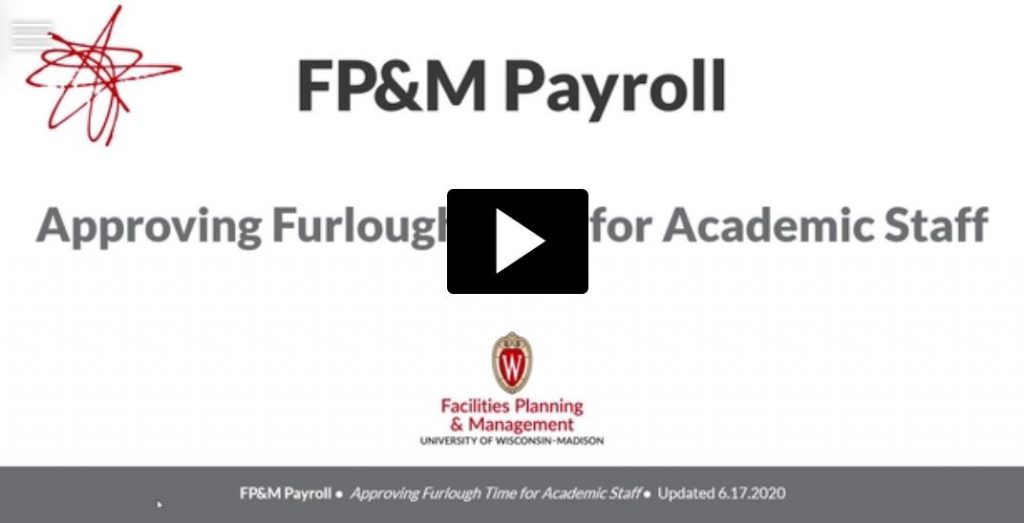
Academic Staff can record furlough in one-hour increments. Furlough must be reported in these whole hour increments using the code FURLM. Record the hours in the quantity field.
All other furlough guidelines for Academic Staff remain the same
Academic Staff employees who are paid monthly must enter all time and absences through MyUW. This includes two actions:
1) Record furlough time in the Timesheet tab, and 2) Monthly leave reporting in the Request Absence tab. See overview instructions for each, below.
You can also refer to this Academic Staff Job Aid for more detailed time entry instructions.
Record your furlough time right away during the week it is used.
1. Go to MyUW (my.wisc.edu) > Select TIME AND ABSENCE tile
2. Use TIMESHEET tab for entering the furlough day and hours worked for that week
3. Find the Time/Absence Code dropdown menu
> Select the code FURLM for any full or partial furlough days (in Timesheet)
> Enter hours (as whole hour increments) under Quantity
4. For the remainder of the days in that week, enter the FUREG code in the timesheet for hours worked during the same week. Enter FUREG hours worked (as whole hour increments) under Quantity.
Do not enter exact hours in the Shift In/Break Out/Break In/Shift Out columns.
5. Click “Submit” button.
As a reminder, your furlough entry is not the only action required for the month. Enter your vacation, personal holiday, sick leave time, or “no leave taken” as follows:
Use the REQUEST ABSENCE tab to record your monthly leave usage, even if you did not take any leave days for the month.
Click the Submit button in the upper right corner
Q: Do I need to log furlough in my monthly leave reporting (Absences in MyUW)?
A: No. Please do not use the furlough code or log furlough days in your monthly leave reporting.
Q: If my only days off in a given month were furlough days, do I still need to enter a “No Leave Taken”?
A: Yes. Furlough is different from Leave. Enter a No Leave Taken as you normally would in your Monthly Leave Reporting using the Request Absence tab on MyUW as shown above.
If you have questions on furlough entry, please email benefits@fpm.wisc.edu.
It is very important to log furlough days properly for compliance reasons. Logging furlough time is different for University Staff and Academic staff. See instructions for each, below. Also see important timing for all employees to be aware of, located at the end of this post.
Update 6/16/20: Academic staff are now able to record furlough in one-hour increments and must use different codes: refer to new information for Academic Staff to Log Their Furlough Time.
If you have questions on furlough entry, please email benefits@fpm.wisc.edu.
Updated 5/28/20

Employees may have questions about how recent events correlate with Flexible Spending Accounts (FSAs).
This communication will address some of the questions employees may have regarding these benefits.
At any time (not only in our current situation), if there is a unexpected change in child care location/situation (ie. daycare facility closes) and/or cost (ie. parent goes back to work – enrolling child in daycare), this does allow an employee to make changes to their Dependent Care Flexible Spending Account (DCFSA).
If the employee is now staying home with their child(ren) and the child(ren) are no longer in daycare, they may submit an Election Change Request within 30 days of the Qualifying Event: Change in Cost. The change will take place the 1st of the month on/following the receipt of the application.
This will also work vice versa. If the child(ren) should return to daycare, the employee may submit a new Election Change Request within 30 days of the Qualifying Event to reinstate/re-enroll in this benefit.
The Election Change Request may be completed electronically by the employee and submitted directly to FP&M Benefits.
Please note, this is not a required change; this is optional. If the employee(s) do not want to make a change; no action is needed.
At this time, there is not Qualifying Event in regards to the current events to enroll, change or cancel these contributions. The employee must have a standard Qualifying Event to make a change mid-year to the Medical FSA. If the employee is unsure of the Qualifying Events that are required, they may refer to the UW-System: Life Events Website.
YEAR-TO-DATE CONTRIBUTIONS
Unfortunately, at this time; we have not received further guidance on whether or not FSA (either Medical or Dependent Care) contributions would be eligible for rollover in 2021; more than the IRS guidelines currently allow. A change such as this is determine by the vendor, IRS guideline changes and the duration of the current events. We will continue to monitor the situation and work with UW-Shared Services and Connect Your Care (CYC) to determine any changes that may occur.
At this time, the current guidelines are still in effect and FSA contributions (with the exception of the standard $500 Medical FSA rollover) must be used prior to end of day 12/31/2020 or in cases of termination prior to 12/31/2020 – the last day of the month in which the last deduction occurred. To use the funds past a termination date (ie. last contribution), the employee would need to contribute the remaining balance of the annual election; which would allow the account to remain active (although no longer employed at UW) through the remainder of 2020.
Again, we will continue to monitor the current events and update you on any changes and/or allowances that may occur to these accounts.
Please contact FP&M Benefits if you have any questions (benefits@fpm.wisc.edu).